> ## Documentation Index
> Fetch the complete documentation index at: https://docs.gitnotifier.com/llms.txt
> Use this file to discover all available pages before exploring further.
# Slack Permissions
> Understand GitNotifier Slack app scopes, why each permission is required, and how workspace admins can approve permission updates safely.
GitNotifier only requests **Bot Token Scopes**. We do **not** request or use Slack User Token Scopes. We follow the least privileges principle, we only ask scopes we need for GitNotifier to work. You can only review the current permissions on the slack app itself.
If Slack says `/gitnotifier` is not a valid command, see [Troubleshooting](./troubleshooting#slack-says-gitnotifier-is-not-a-valid-command).
Notice that we **do** **not** **read** **your slack messages.**
## Update permissions when the Slack app scopes change
When GitNotifier ships a feature that needs new Slack scopes, your workspace admin must approve the updated permissions.
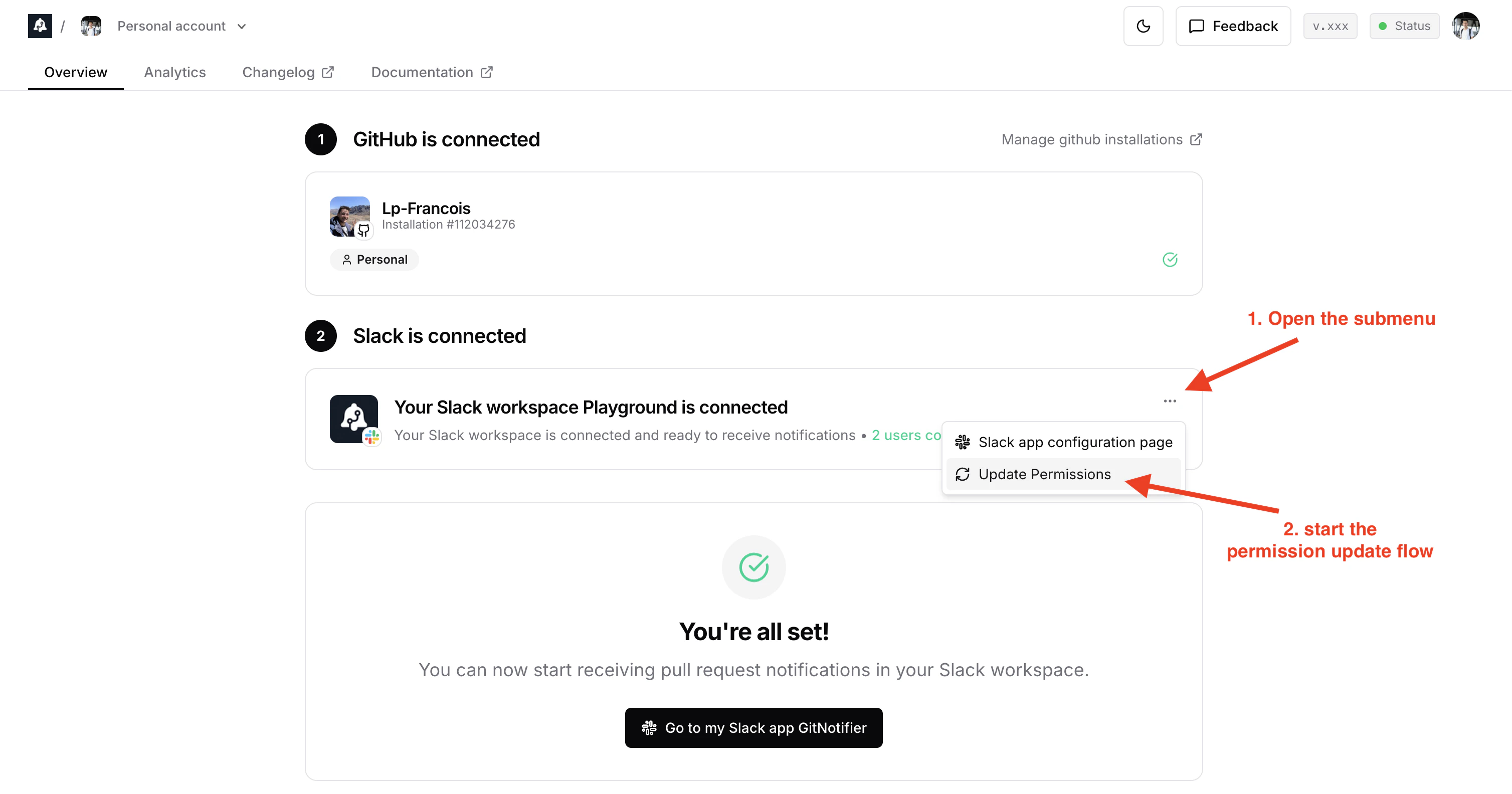
From the [gitnotifier Dashboard](https://www.gitnotifier.com/dashboard):
1. Go to the **Slack is connected** card.
2. Click the **three-dot menu** in the top-right of the Slack card.
3. Click **Update Permissions**.
1. If you are a Slack admin, you can do the permissions update flow in 2 clicks.
2. If you are not a Slack admin, Slack lets you submit a permissions update request and notifies your workspace admins by email that they need to approve it.
 ## Requested Bot Token Scopes
### `chat:write`
Send messages as `@GitNotifier`.
Why we need it:
* Send direct notifications for GitHub events (new comments, CI failures, PR ready to merge, and similar updates).
### `commands`
Add slash commands and shortcuts.
Why we need it:
* Support Slack command actions like muting/unmuting PRs.
* Support account connect/authorize flows from Slack without requiring App Home navigation.
### `emoji:read`
View custom emoji in a workspace.
Why we need it:
* Support richer message presentation when teams use custom GitHub/PR-related emoji.
### `im:write`
Start direct messages with people.
Why we need it:
* GitNotifier is primarily DM-based to avoid channel spam.
### `reactions:read`
View emoji reactions and associated content where GitNotifier is present.
Why we need it:
* Read user reaction inputs when reactions are used as lightweight actions.
### `reactions:write`
Add and edit emoji reactions.
Why we need it:
* Reflect action status with reactions (for example, adding a success/check reaction).
### `team:read`
View workspace name, email domain, and icon.
Why we need it:
* Show workspace identity (name and icon) in GitNotifier UI for better workspace management UX.
### `users:read`
View people in a workspace.
Why we need it:
* Support GitHub user to Slack user mapping for accurate notifications and mentions. It replaces the Github handle by the Slack handle in the PR notifications (it's convenient as Github usernames are often different from the Slack usernames).
## Requested Bot Token Scopes
### `chat:write`
Send messages as `@GitNotifier`.
Why we need it:
* Send direct notifications for GitHub events (new comments, CI failures, PR ready to merge, and similar updates).
### `commands`
Add slash commands and shortcuts.
Why we need it:
* Support Slack command actions like muting/unmuting PRs.
* Support account connect/authorize flows from Slack without requiring App Home navigation.
### `emoji:read`
View custom emoji in a workspace.
Why we need it:
* Support richer message presentation when teams use custom GitHub/PR-related emoji.
### `im:write`
Start direct messages with people.
Why we need it:
* GitNotifier is primarily DM-based to avoid channel spam.
### `reactions:read`
View emoji reactions and associated content where GitNotifier is present.
Why we need it:
* Read user reaction inputs when reactions are used as lightweight actions.
### `reactions:write`
Add and edit emoji reactions.
Why we need it:
* Reflect action status with reactions (for example, adding a success/check reaction).
### `team:read`
View workspace name, email domain, and icon.
Why we need it:
* Show workspace identity (name and icon) in GitNotifier UI for better workspace management UX.
### `users:read`
View people in a workspace.
Why we need it:
* Support GitHub user to Slack user mapping for accurate notifications and mentions. It replaces the Github handle by the Slack handle in the PR notifications (it's convenient as Github usernames are often different from the Slack usernames).