
Command says missing thread context
For/gitnotifier mute and /gitnotifier unmute without explicit PR ref, run command in a PR thread.
Alternative: pass explicit reference like owner/repo#123.
Slack says /gitnotifier is not a valid command
If /gitnotifier is missing or Slack reports it as not valid, the Slack app likely needs to be updated with newer permissions.
From time to time, new GitNotifier features require additional Slack permissions.
Example: slash commands require the command permission/scope to be granted to the Slack app.
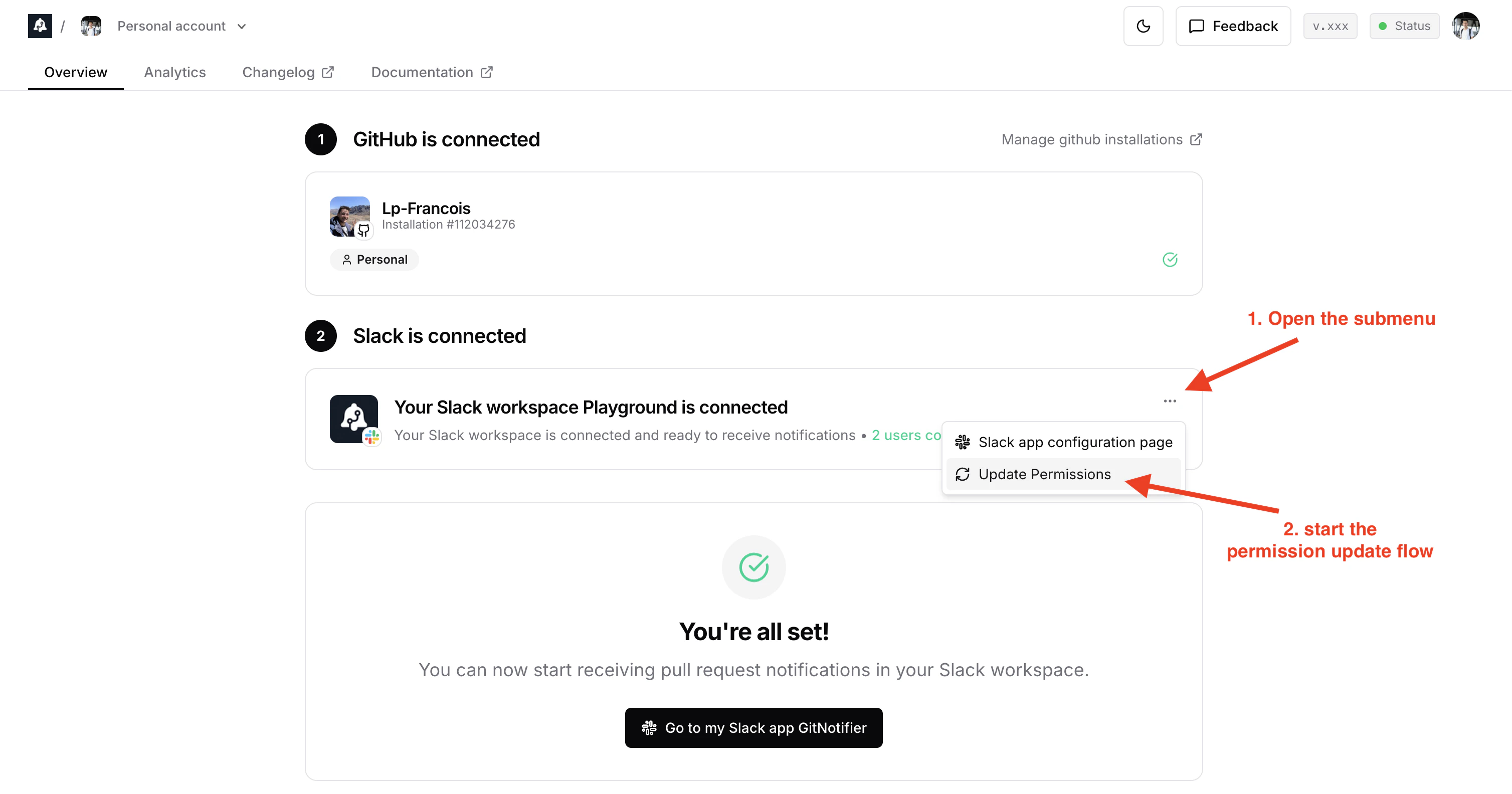
Quick fix from the dashboard:
- Open Dashboard → Step 2: Slack is connected.
- Open the three-dot menu on the Slack card.
- Click Update Permissions.
- If you are a Slack admin, just follow the steps to update the permissions.
- If you are not a Slack admin, submit the request in Slack. Workspace admins should receive an email to approve it.
Command cannot parse PR reference
Use one of:owner/repo#123https://github.com/owner/repo/pull/123https://github.com/owner/repo/pull/123#discussion_r456
/gitnotifier mute, you can also use free text to search open PR titles (for example NT-6879 or fix issue with memory).
The title search is scoped to your own relevant PRs:
is:pr is:open archived:false in:title "<search text>" involves:@me
Command search returns multiple PRs
GitNotifier shows up to 3 matching open PRs. Pick one by running/gitnotifier mute owner/repo#123, or refine your search text.
Command search returns no PR
Try a more specific search text, or use an explicit PR reference format:owner/repo#123https://github.com/owner/repo/pull/123
/gitnotifier muted shows no results
If you see “You have no muted PRs right now.”, no PR-level mute rules are currently stored for your connected GitHub account.
You can create one with:
/gitnotifier mute owner/repo#123
Slack says reconnect required
Open GitNotifier App Home and click Reconnect GitHub.Slack actions fail with SSO/SAML message
Your org requires GitHub SSO authorization. Re-authorize GitNotifier, then retry action.No GitHub connection found
Open GitNotifier App Home in Slack and complete Connect GitHub.I did not get a review comment notification
Check the comment type first:- Top-level bot review comments do not notify anyone 🤖.
- Review-thread replies notify the PR author, non-bot thread participants, and the replied human user (excluding sender, deduped).
- Replies to bot comments skip the replied-user recipient, but can still notify PR author and non-bot thread participants.
@mentions:
- Mentioned users are notified only if they are mapped in GitNotifier’s DB.
- Top-level bot comments still do not notify anyone, even with mentions.
I’m not getting notifications for bot comments
By default, GitNotifier mutes all bot comments to reduce noise. To receive them:- Open the Slack App Home (
@GitNotifier). - Go to mute settings.
- Disable Mute all comments from bots.
[bot] suffix). Bot senders are prefixed with a robot emoji 🤖 so you can tell them apart from human comments at a glance.
Notifications are truncated or cut off
By default, GitNotifier trims GitHub comments to a short preview in Slack. To receive the full content:- Open the Slack App Home (
@GitNotifier). - Go to Feature preview.
- Turn off Truncate GitHub comments.